Install Sublime Text 3 on CentOS 7

Sublime Text is one of the powerful text editor available for CentOS 7. Sublime Text can be used as text or source code editor for web and software development. You can also extend the functionality of Sublime Text using plugins. Prerequisites Before you start to install Sublime Text 3 on CentOS 7. You must have … Read more


Trending Technologies To Master In 2020

Change is the only constant. This applies in your professional life as well. Up-scaling yourself is a need nowadays, the reason is pretty simple, technology is evolving very quickly. I have listed top 10 trending technologies, which is expected to acquire a huge market in 2020. So, let’s make a new year resolution to master any … Read more

shell embedding and options

shell embedding Shells can be embedded on the command line, or in other words, the command line scan can spawn new processes containing a fork of the current shell. You can use variables to prove that new shells are created. In the screenshot below, the variable $var1 only exists in the (temporary) sub shell. You … Read more

shell variables

In this post we learn to manage environment variables in the shell. These variables are often needed by applications. $ dollar sign Another important character interpreted by the shell is the dollar sign $. The shell will look for an environment variable named like the string following the dollar sign and replace it with the … Read more

control operators

In this post we put more than one command on the command line using control operators. We also briefly discuss related parameters ($?) and similar special characters(&). ; semicolon You can put two or more commands on the same line separated by a semicolon ; . The shell will scan the line until it reaches … Read more

commands and arguments(shell expansion)

arguments One of the primary features of a shell is to perform a command line scan. When you enter a command at the shell’s command prompt and press the enter key, then the shell will start scanning that line, cutting it up in arguments. While scanning the line, the shell may make many changes to … Read more

the Linux file tree

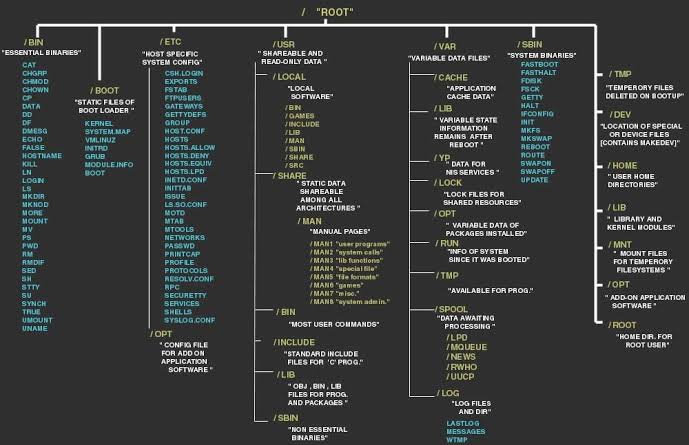
This post takes a look at the most common directories in the Linux file tree. It also shows that on Unix everything is a file. filesystem hierarchy standard Many Linux distributions partially follow the Filesystem Hierarchy Standard. The FHS may help make more Unix/Linux file system trees conform better in the future. The FHS is … Read more

working with files

In this post we learn how to recognise, create, remove, copy and move files using commands like file, touch, rm, cp, mv and rename. all files are case sensitive Files on Linux (or any Unix) are case sensitive. This means that FILE1 is different from file1, and /etc/hosts is different from /etc/Hosts (the latter one … Read more

working with linux directories

This module is a brief overview of the most common commands to work with directories: pwd, cd, ls, mkdir and rmdir. These commands are available on any Linux (or Unix) system. pwd The you are here sign can be displayed with the pwd command (Print Working Directory). Go ahead, try it: Open a command line … Read more