Installing Google Chrome on CentOS

Follow the steps listed below to install Google Chrome on your CentOS system: Start by opening your terminal and downloading the latest Google Chrome .rpm package with the following wget command: wget https://dl.google.com/linux/direct/google-chrome-stable_current_x86_64.rpm Once the file is downloaded, install Google Chrome on your CentOS 7 system by typing: sudo yum localinstall google-chrome-stable_current_x86_64.rpm The command above … Read more

How to List All Files Ordered by Size in Linux

Linux yum

How to List All Files Ordered by Size in Linux This articles about listing files using the popular ls command, we covered how to list and sort files by last modification time (date and time) in Linux. To list all files in a directory, open a terminal window and run the following command. Note that when ls invoked … Read more

Example of linux find command

find command linux

Example of linux find command Find Command is one of the most important and frequently used command command-line utility in Unix-like operating systems. Find command is used to search and locate the list of files and directories based on conditions you specify for files that match the arguments. Find can be used in a variety of … Read more

Install Sublime Text 3 on CentOS 7

Sublime Text is one of the powerful text editor available for CentOS 7. Sublime Text can be used as text or source code editor for web and software development. You can also extend the functionality of Sublime Text using plugins. Prerequisites Before you start to install Sublime Text 3 on CentOS 7. You must have … Read more

shell embedding and options

shell embedding Shells can be embedded on the command line, or in other words, the command line scan can spawn new processes containing a fork of the current shell. You can use variables to prove that new shells are created. In the screenshot below, the variable $var1 only exists in the (temporary) sub shell. You … Read more

shell variables

In this post we learn to manage environment variables in the shell. These variables are often needed by applications. $ dollar sign Another important character interpreted by the shell is the dollar sign $. The shell will look for an environment variable named like the string following the dollar sign and replace it with the … Read more

control operators

In this post we put more than one command on the command line using control operators. We also briefly discuss related parameters ($?) and similar special characters(&). ; semicolon You can put two or more commands on the same line separated by a semicolon ; . The shell will scan the line until it reaches … Read more

commands and arguments(shell expansion)

arguments One of the primary features of a shell is to perform a command line scan. When you enter a command at the shell’s command prompt and press the enter key, then the shell will start scanning that line, cutting it up in arguments. While scanning the line, the shell may make many changes to … Read more

the Linux file tree

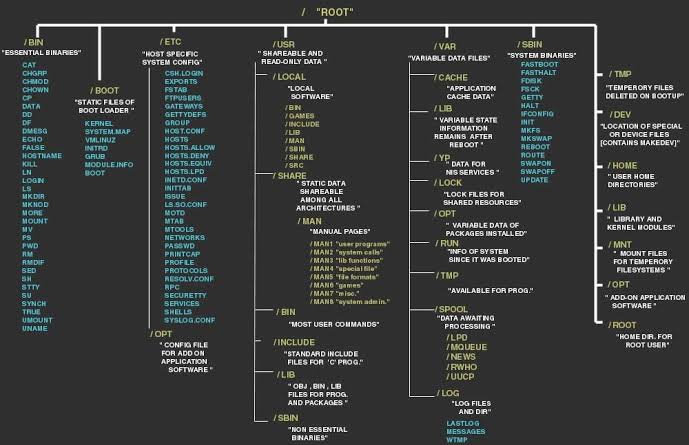
This post takes a look at the most common directories in the Linux file tree. It also shows that on Unix everything is a file. filesystem hierarchy standard Many Linux distributions partially follow the Filesystem Hierarchy Standard. The FHS may help make more Unix/Linux file system trees conform better in the future. The FHS is … Read more