Skip to content

Eduguru

  • Tutorial and Training
    • Who Breaks into Computer Systems
    • Planning and Performing Hacking Attacks
    • Maintaining Anonymity
    • Selecting Security Assessment Tools
    • Scanning Systems
  • Contact Us
    • Feedback
  • Business
    • Solutions
      • Job : Dialer Support
    • Domain Registration
    • Web Hosting
    • Consultancy
    • Dialer Support
  • About Us
  • News
  • Donate Online
  • Offers
  • WPMS HTML Sitemap
  • Log In
  • Log Out
  • Register
  • Lost Password
  • Reset Password
  • Download
  • Result
  • search
  • MySQL – Video Tutorial
  • Products Page
    • Checkout
    • Transaction Results
    • Your Account
  • Privacy
  • Amazon
  • Get Computer Books
  • Amazon Sale Offer

Forgotten Password Functionality

April 30, 2020 by Krishna

Like password change functionality, mechanisms for recovering from a forgotten password situation often introduce problems that may have been avoided in the main login function, such as username enumeration.

In addition to this range of defects, design weaknesses in forgotten password functions frequently make this the weakest link at which to attack the application’s overall authentication logic. Several kinds of design weaknesses can often be found:

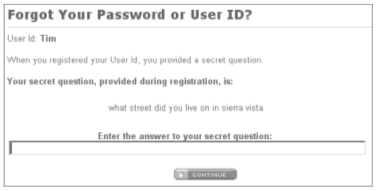
■The forgotten password functionality often involves presenting the user with a secondary challenge in place of the main login, as shown in Figure -1. This challenge is often much easier for an attacker to respond to than attempting to guess the user’s password. Questions about mothers’ maiden names, memorable dates, favorite colors, and the like will generally have a much smaller set of potential answers than the set of possible passwords. Further, they often concern information that is publicly known or that a determined attacker can discover with a modest degree of effort.
Screenshot from 2020-04-30 22:12:00

Figure -1: A secondary challenge used in an account recovery function

In many cases, the application allows users to set their own password recovery challenge and response during registration, and users are inclined to set extremely insecure challenges, presumably on the false assumption that only they will ever be presented with them, for example: “Do I own a boat?” In this situation, an attacker wishing to gain access can use an automated attack to iterate through a list of enumerated or common usernames, log all of the password recovery challenges, and select those that appear most easily guessable.

■ As with password change functionality, application developers commonly overlook the possibility of brute forcing the response to a password recovery challenge, even when they block this attack on the main login page. If an application allows unrestricted attempts to answer password recovery challenges, then it is highly likely to be compromised by a determined attacker.

■ In some applications, the recovery challenge is replaced with a simple password “hint” that is configurable by users during registration. Users commonly set extremely obvious hints, even one that is identical to the password itself, on the false assumption that only they will ever see them. Again, an attacker with a list of common or enumerated usernames can easily capture a large number of password hints and then start guessing.

■ The mechanism by which an application enables users to regain control of their account after correctly responding to a challenge is often vulnerable. One reasonably secure means of implementing this is to send a unique, unguessable, time-limited recovery URL to the email address that the user provided during registration. Visiting this URL within a few minutes enables the user to set a new password. However, other mechanisms for account recovery are often encountered that are insecure by design:

■ Some applications disclose the existing, forgotten password to the user after successful completion of a challenge, enabling an attacker to use the account indefinitely without any risk of detection by the owner. Even if the account owner subsequently changes the blown password, the attacker can simply repeat the same challenge to obtain the new password.
■ Some applications immediately drop the user into an authenticate session after successful completion of a challenge, again enabling an attacker to use the account indefinitely without detection, and with- out ever needing to know the user’s password.
■ Some applications employ the mechanism of sending a unique recovery URL but send this to an email address specified by the user at the time the challenge is completed. This provides absolutely no enhanced security of the recovery process beyond possibly logging the email address used by an attacker.

■ Some applications allow users to reset their password’s value directly after successful completion of a challenge and do not send any email notification to the user. This means that the compromising of an account by an attacker will not be noticed until the owner happens to attempt to log in again, and may even remain unnoticed if the owner assumes that they must have forgotten their own password and so resets it in the same way. An attacker who simply desires some access to the application can then compromise a different user’s account for a period and so continue using the application indefinitely.


NEXT is..“Remember Me” Functionality………..,.,.,.,.,.,.,.,

Categories Tutorial, Web Hosting, Website Tags account recovery function, Attacking Authentication, forgotten password, Forgotten Password Functionality, HACKING, mechanisms, PASSWORD, URL, web hacking
Password Change Functionality
Remember Me” Functionality

Recent Posts

  • 10 Digital India Initiatives Every Student Should Know
  • Top 10 Antivirus Software for Windows in India: 2026 Edition
  • Mailchimp vs Sendinblue vs MoEngage: The Ultimate Email Marketing Comparison
  • Top 10 Email Marketing Tools for Indian Businesses in 2023
  • How to Convert PDF Pages to JPG Online – Step-by-Step Guide
  • 5G in India: Comprehensive Benefits and Availability Guide
  • How to Convert JPG Images to PDF Online – Step-by-Step Guide
  • Top 10 Free Project Management Tools for Small Teams
  • How to Convert PDF to Word Without Losing Formatting – Step-by-Step Guide
  • Notion vs Evernote vs Google Keep: The Ultimate Student Comparison
  • How to Compress a PDF Without Losing Quality – Step-by-Step Guide
  • How to Merge PDF Files Online for Free – Step-by-Step Guide
  • Teaching Jobs in India: Eligibility and Exams Explained
  • How to Edit a PDF Online for Free – A Simple Step-by-Step Guide
  • 10 Essential Soft Skills Every Indian Graduate Needs
  • The Ultimate Internship Guide for Indian College Students
  • Mastering Salary Negotiation in Indian Companies: A Step-by-Step Guide
  • Content Writing as a Career in India: A Complete Guide
  • Essential Tips for Effective Campus Placement Preparation
  • How to Successfully Switch Careers in Your 30s in India
  • Mastering Time Management for Effective Exam Preparation
  • Top 10 YouTube Channels for NEET Preparation in 2023
  • How Indian Students Can Enhance Their English Speaking Skills
  • 10 Exciting Summer Projects for School Students in India
  • Ultimate Guide to Preparing for Olympiad Exams in India
  • NCERT vs Reference Books for Board Exams: A Comprehensive Comparison
  • How AI is Transforming Online Education in India
  • Top 10 AI Tools for Learning Python in India
  • Google NotebookLM vs ChatGPT for Research: A Comprehensive Comparison
  • Top 10 Speech-to-Text AI Tools for Hindi and English
  • Top 10 AI Tools Every Startup Founder in India Should Use
  • How Schools in India Can Use AI Safely: A Comprehensive Guide
  • EPFO and UAN: Essential Guide for First-Time Job Holders
  • Unlocking Opportunities: Skill India Mission’s Free Courses & Certifications
  • Mudra Loan Scheme: A Comprehensive Guide to Application
  • Unlocking Startup India: Key Benefits for Entrepreneurs
  • PM Kisan Scheme: Benefits and Registration Guide
  • Ayushman Bharat Scheme Explained Simply
  • How to Protect Your Phone from Cyber Fraud in India
  • Understanding Cloud Computing: A Beginner’s Guide
  • WordPress vs Blogger vs Medium: The Ultimate Comparison for Indian Bloggers
  • Android vs iPhone: The Ultimate Comparison for Indian Users
  • Top 10 VPN Services for Indians: Stay Safe Online
  • Hostinger vs Bluehost vs GoDaddy India: A Comprehensive Comparison
  • Exotel vs MyOperator vs Knowlarity: Cloud Telephony Compared
  • WhatsApp Cloud API vs BSP Providers: In-Depth Comparison
  • Freshdesk vs Zoho Desk vs HubSpot: A Comprehensive Helpdesk Comparison
  • How to Start a Side Hustle in India: A Comprehensive Guide
  • Railway Jobs in India: A Comprehensive Guide on How to Apply
  • Cybersecurity Career in India: How to Start Your Journey

Recent Post

  • 10 Digital India Initiatives Every Student Should Know
  • Top 10 Antivirus Software for Windows in India: 2026 Edition
  • Mailchimp vs Sendinblue vs MoEngage: The Ultimate Email Marketing Comparison
  • Top 10 Email Marketing Tools for Indian Businesses in 2023
  • How to Convert PDF Pages to JPG Online – Step-by-Step Guide
© 2026 Eduguru • Built with GeneratePress