A central security requirement that virtually any application needs to meet is to control users’ access to its data and functionality. In a typical situation, there are several different categories of user; for example, anonymous users, ordinary authenticated users, and administrative users. Further, in many situations different users are permitted to access a different set of data; for example, users of a web mail application should be able to read their own email but not other people’s.
Most web applications handle access using a trio of interrelated security mechanisms:
■ Authentication
■ Session management
■ Access control
Each of these mechanisms represents a significant area of an application’s attack surface, and each is absolutely fundamental to an application’s overall security posture. Because of their inter dependencies, the overall security provided by the mechanisms is only as strong as the weakest link in the chain. A defect in any single component may enable an attacker to gain unrestricted access to the application’s functionality and data.
Authentication
The authentication mechanism is logically the most basic dependency in an application’s handling of user access. Authenticating a user involves establishing that the user is in fact who he claims to be. Without this facility, the application would need to treat all users as anonymous — the lowest possible level of trust.
The majority of today’s web applications employ the conventional authentication model in which the user submits a username and password, which the application checks for validity. Figure -1 shows a typical login function. In security-critical applications such as those used by online banks, this basic model is usually supplemented by additional credentials and a multistage login process. When security requirements are higher still, other authentication models may be used, based on client certificates, smartcards, or challenge-response tokens. In addition to the core login process, authentication mechanisms often employ a range of other supporting functionality, such as self-registration, account recovery, and a password change facility.

Figure -1: A typical login function
Despite their superficial simplicity, authentication mechanisms suffer from a wide range of defects, in both design and implementation. Common problems may enable an attacker to identify other users’ usernames, guess their passwords, or bypass the login function altogether by exploiting defects in its logic. When you are attacking a web application, you should invest a significant amount of attention in the various authentication-related functions that it contains. Surprisingly frequently, defects in this functionality will enable you to gain unauthorized access to sensitive data and functionality.
Session Management
The next logical task in the process of handling user access is to manage the authenticated user’s session. After successfully logging in to the application, the user will access various pages and functions, making a series of HTTP requests from their browser. At the same time, the application will be receiving countless other requests from different users, some of whom are authenticated and some of whom are anonymous. In order to enforce effective access control, the application needs a way of identifying and processing the series of requests that originate from each unique user.
Virtually all web applications meet this requirement by creating a session for each user and issuing the user a token that identifies the session. The session itself is a set of data structures held on the server, which are used to track the state of the user’s interaction with the application. The token is a unique string that the application maps to the session. When a user has received a token, the browser automatically submits this back to the server in each sub-sequent HTTP request, enabling the application to associate the request with that user. HTTP cookies are the standard method for transmitting session tokens, although many applications use hidden form fields or the URL query string for this purpose. If a user does not make a request for a given period, then the session is ideally expired.
In terms of attack surface, the session management mechanism is highly dependent on the security of its tokens, and the majority of attacks against it seek to compromise the tokens issued to other users. If this is possible, an attacker can masquerade as the victim user and use the application just as if they had actually authenticated as that user. The principal areas of vulnerability arise from defects in the way tokens are generated, enabling an attacker to guess the tokens issued to other users, and defects in the way tokens are subsequently handled, enabling an attacker to capture other users’ tokens.
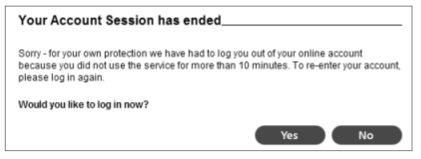
Figure -2: An application enforcing session timeout
A small number of applications dispense with the need for session tokens by using other means of re-identifying users across multiple requests. If HTTP’s built-in authentication mechanism is used, then the browser automatically resubmits the user’s credentials with each request, enabling the application to identify the user directly from these. In other cases, the application stores the state information on the client side rather than the server, usually in encrypted form to prevent tampering.
Access Control
The final logical step in the process of handling user access is to make and enforce correct decisions regarding whether each individual request should be permitted or denied. If the preceding mechanisms are functioning correctly, the application knows the identity of the user from whom each request is received. On this basis, it needs to decide whether that user is authorized to perform the action, or access the data, that he is requesting.
The access control mechanism usually needs to implement some finegrained logic, with different considerations being relevant to different areas of the application and different types of functionality. An application might support numerous different user roles, each involving different combinations of specific privileges. Individual users may be permitted to access a subset of the total data held within the application. Specific functions may implement transaction limits and other checks, all of which need to be properly enforced based on the user’s identity.
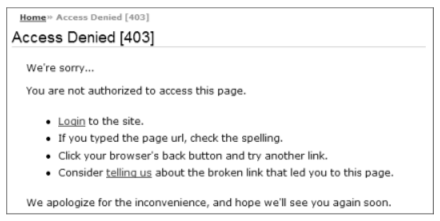
Figure -3: An application enforcing access control
Because of the complex nature of typical access control requirements, this mechanism is a frequent source of security vulnerabilities that enable an attacker to gain unauthorized access to data and functionality. Developers very often make flawed assumptions about how users will interact with the application, and frequently make oversights by omitting access control checks from some application functions. Probing for these vulnerabilities is often laborious because essentially the same checks need to be repeated for each item of functionality. Because of the prevalence of access control flaws, how- ever, this effort is always a worthwhile investment when you are attacking a web application.
next article is…Handling User Input……..