How to Format USB Flash Drive from Command Prompt
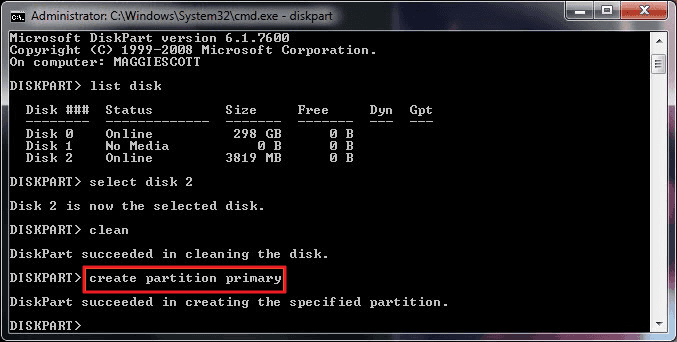
Step 1: Type cmd in the search box, then you can get the best match called Command Prompt. Right-click on it and choose “Run as administrator”. Step 2: On the Command Prompt window, type diskpart and press “Enter” Step 3: Type list disk and press “Enter”. According to the list disk information, check which disk … Read more
LinuxLive USB Creator

;:LinuxLive USB Creator is a free and open-source software for Windows. It will help you in your journey of discovery with Linux. For you, LiLi creates portable, bootable and virtualized USB stick running Linux. Not only for geeks LiLi is designed to be used by both beginners and geeks. If you are a beginner, LiLi … Read more

WINDOWS VS. LINUX DESIGN

It is possible that email and browser-based viruses, Trojans and worms are the source of the myth that Windows is attacked more often than Linux. Clearly there are more desktop installations of Windows than Linux. It is certainly possible, if not probable, that Windows desktop software is attacked more often because Windows dominates the desktop. … Read more

SMART SCREEN

Windows Smart Screen is a reputation system for downloaded software. Smart Screen Application. Reputation was originally included in Microsoft Internet Explorer 9 but was moved into the core Windows 8 operating system to offer broader protection. When Windows Smart Screen is activated, an application downloaded from the Internet is compared to the Smart Screen database. … Read more

WINDOWS 8 SECURITY

PROTECTING THE CLIENT AGAINST THREATS Microsoft Windows 8 builds on the security features of Windows 7. It enables the enterprise to provide a secure and stable computing platform from which users can accomplish their tasks. Two primary areas are the focus of the Microsoft security approach. Those areas include the following: 1. Protect the client … Read more

WINDOWS 8 FEATURES

NEW FEATURES OF WINDOWS 8 Windows 8 focuses on users‘ lives. It is beautiful. Fast. Fluid. It‘s also perfect for a range of devices. This includes PCs, of course, but also compact, touch-enabled tablet PCs; lightweight laptops; and large, powerful all-in-one PCs with high-definition screens. Windows 8 is smooth and intuitive. Users have instant access … Read more

WINDOWS 7 & WINDOWS 8 SIMILARITIES

SIMILARITIES BETWEEN WINDOWS 7 & WINDOWS 8 Windows 8 is just an improvement of windows 7 features. But still there exists some points that are common in both & they are: Windows 8 uses the same management tools that you already use to support Windows 7 in your organization. The Windows 7 desktop features you … Read more

Mount.cifs cannot allocate memory : Mounting windows share

Mounting a Windows (cifs) share on centos gives us a “Mount.cifs cannot allocate memory” error. Executing a command like this: mount -t cifs //toad/Backup /media/backup -o user=username,password=password,iocharset=utf8,file_mode=0777,dir_mode=0777 We get an error like this: mount error(12): Cannot allocate memory Refer to the mount.cifs(8) manual page (e.g. man mount.cifs) Solution: First, check the permissions on your shared … Read more

How to show or hide file name extensions in windows

windows

For Windows Vista, Windows 7, and Windows Server 2008 Start Windows Explorer, you can do this by opening up any folder. Click Organize. Click Folder and search options. Click the View tab. Scroll down until you notice Hide extensions for known file types, un-check this line by clicking the check box. Note To hide file name extensions, check this line. Click OK … Read more

Turn on Remote Desktop in Windows 7, 8 or Vista

Remote Desktop is disabled by default in Windows 7, 8, or Vista, but it’s easy enough to turn it back on. If you need to access your Windows PC from another box, it’s an essential thing to turn on. Important note: Remote desktop is only included in the Professional, Business, or Ultimate versions of Windows. … Read more