Enable setup command in CentOS minimal install
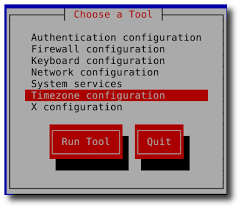
setup utility

  Generally setup command is not used to install in centos minimal installation: Here is the step to install setup command in centos: # yum install setuptool -y # yum install system-config-network* -y # yum install system-config-firewall* -y # yum install system-config-securitylevel-tui -y # yum install system-config-keyboard -y # yum install ntsysv -y

How to Install and Configure OpenSSH Server In Linux

Being a network administrator requires a deep knowledge about remote login protocols such as rlogin, telnet and ssh. The one I will discuss in this article is ssh, a secure remote protocol which is used to work remotely on other machines or transfer data between computers using SCP (Secure Copy) command. But, what is OpenSSH and how to install it in your Linux distribution? … Read more

Stop firewall services centos : linux firewall service stop at startup

Check the Status of The Iptables IPv4 Firewall Run the following command to check the status of the iptables IPv4 firewall : # service iptables status Disable The Iptables Firewall Use the following commands to stop the Iptables Firewall and remove it from autostart. Disable The Iptables IPv4 Firewall Run the following commands to stop the iptables firewall … Read more

Mount.cifs cannot allocate memory : Mounting windows share

Mounting a Windows (cifs) share on centos gives us a “Mount.cifs cannot allocate memory” error. Executing a command like this: mount -t cifs //toad/Backup /media/backup -o user=username,password=password,iocharset=utf8,file_mode=0777,dir_mode=0777 We get an error like this: mount error(12): Cannot allocate memory Refer to the mount.cifs(8) manual page (e.g. man mount.cifs) Solution: First, check the permissions on your shared … Read more

Changing centos/redhat run level init 3

chane run level centos

What is a runlevel ? Runlevel is the preset state in which a Linux system operates. Below mentioned are the different runlevels of a Linux system in which a linux system can be operated 0-  halt or shutdown 1- single user mode 2- multi user mode without NFS 3- full multi-user mode 4- not used … Read more

Change HostName From Command Line Linux

To change the  hostname, follow the steps shown below. 1. Use hostname command to Change Hostname In this example, we’ll change the hostname from dev-server to prod-server. hostname command by default will display the current hostname as shown below: # hostname dev-server The following will change the hostname to prod-server. # hostname prod-server Once the … Read more

TOP command in Linux

top provides an ongoing look at processor activity in real time. It displays a listing of the most CPU-intensive tasks on the system, and can provide an interactive interface for manipulating processes. It can sort the tasks by CPU usage, memory usage and runtime. can be better configured than the standard top from the procps suite. … Read more

find the number of CPU cores on Linux

Multi-core CPU processors are common nowadays, including dual-core processors (e.g., Intel Core Duo), quad-core processors (e.g., Intel Core i5), and hexa-core processors (e.g., AMD Phenom II X6). Also, many server-grade physical machines are equipped with more than one CPU processor. To find the number of physical CPUs: $ cat /proc/cpuinfo | grep “^physical id” | … Read more

WARNING: REMOTE HOST IDENTIFICATION HAS CHANGED!

WARNING: REMOTE HOST IDENTIFICATION HAS CHANGED! @@@@@@@@@@@@@@@@@@@@@@@@@@@@@@@@@@@@@@@@@@@@@@@@@@@@@@@@@@@ @ WARNING: REMOTE HOST IDENTIFICATION HAS CHANGED! @ @@@@@@@@@@@@@@@@@@@@@@@@@@@@@@@@@@@@@@@@@@@@@@@@@@@@@@@@@@@ IT IS POSSIBLE THAT SOMEONE IS DOING SOMETHING NASTY! Someone could be eavesdropping on you right now (man-in-the-middle attack)! It is also possible that the RSA host key has just been changed. The fingerprint for the RSA key sent … Read more